My New Home Lab (I Should Have Set This Up Months Ago)
A late-2013 Mac Pro, VirtualBox VMs, Tailscale mesh networking, and herdr turned a dusty old machine into a full remote dev environment reachable from anywhere.
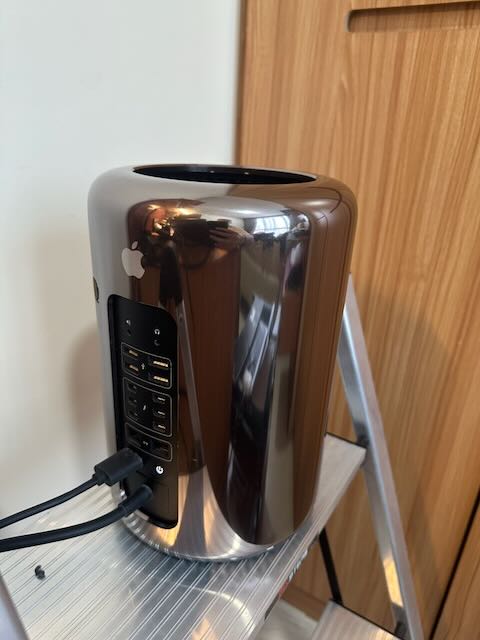
I've had a late-2013 Mac Pro sitting around since I moved, gathering dust. The plan was always to turn it into a Linux server, but I never got around to actually installing Linux on it. That changed last week when I discovered herdr and finally found a real use case for it — that, plus having had an Ollama subscription for a month now and genuinely enjoying working with OpenCode, was enough to push me into action.
herdris a terminal multiplexer built specifically for AI coding agents — think tmux, but with built-in awareness of tools like Claude Code, Codex, and OpenCode. It detects what each pane is running and tracks its state (blocked, working, done, idle) right in the sidebar, so you can glance at a wall of panes and immediately know which agents need your attention. Its modern TUI makes all of that easy to scan at a glance, and it has mouse support too, so switching panes or resizing splits doesn't depend on remembering a keyboard shortcut. The feature that pulled me in, though, is--remote: your local terminal becomes a thin client for a herdr session running on another machine over SSH. Kill your laptop's WiFi, walk to a café, reconnect — the session is just there, agents mid-task and all.
The hardware I already had
The Mac Pro had already been upgraded to 128GB of RAM a while back, and since it still runs VirtualBox, using VMs is a far better and faster setup. I can back them up, cap their resources, and cleanly separate responsibilities by running a dedicated development VM alongside a preview VM.
Even at more than 10 years old, the machine is still powerful enough to run dev service instances and agents — and the UI is still snappy.
I also have an M1 MacBook Pro with 32GB of RAM, which I use for remote Xcode builds and for running Ollama with local, MLX-optimized models like Gemma.
The working environment
On the Mac Pro, I installed VirtualBox and set up two VMs:
- A dev VM running Fedora Desktop, so I can RDP in and use the UI when I need it.
- A server VM running Fedora Server with k3s, which mirrors our production hosting environment.
I still have a good chunk of memory free to add more VMs. I am thinking about a FreeBSD and an OpenBSD, just for old times. 😀
On the dev VM, I installed the usual stack: git, Rust, Go, Java, nvm, Ruby, and OpenCode. GNOME already ships with RDP support, so I just had to enable it.
One surprise: installing herdr via Homebrew on the Mac Pro took more than one hour. It's a good reminder of just how much faster Apple Silicon is compared to that Intel Mac Pro.
Wiring it all together with Tailscale
I am using Cloudflare already as a VPN and to access services from our Kubernetes cluster. I had read about Tailscale too and wanted to give it a try. Now the Mac Pro, the M1 MacBook Pro, two Linux VMs, and my phone all behave like they're on the same LAN. The free Personal plan covers this easily too — it supports up to 6 users with unlimited devices, so cost was never a factor in setting this up.
Tailscale is a mesh VPN built on WireGuard that connects all your devices into a single private network, no matter where they physically are. There's no central server to configure and no port-forwarding on your router — each device runs the Tailscale client, authenticates once, and gets a stable private IP that stays reachable whether it's sitting on your home network or roaming on a café's WiFi.
I installed Tailscale inside both VMs too, so they're reachable the same way as everything else.
The installation runs smoothly and after authenticating the whole networking is already set up and ready. Even on Fedora with the Firewall enabled.
From my daily driver, an M4 MacBook Pro, I now just run herdr --remote m1/dev to connect. What surprised me most is the stability — even after moving from home to a café, the connection comes right back up and is immediately usable, no restarts needed.
Knowledge base and mobile access
I also have Obsidian running on all the machines so I always have access to my knowledge base, and I'm planning to have an agent work on it from the M1.
On mobile, I've installed Tailscale on my iPhone and iPad and confirmed I can SSH in using the Terminus iOS app, running herdr locally and attaching to the same session I have on my Mac. I can also reach the OpenCode web server and a sample service, all routed through Tailscale.
The verdict
All in, it took a bit more than half a day to set everything up — though a good chunk of that was spent just getting the old Mac Pro updated. Well worth it: I now have a full remote dev environment I can reach from anywhere, on any device, that mirrors production and doesn't cost me a cent in cloud compute.
The next steps
I want to have a branch of all my current projects checked out on the dev VM and an agent running in each of them. The preview VM should have the current dev branch deployed for preview and testing.
I want to see how the workflow changes with remote agents and also want to try Zed remote development features with a fallback to VSCode. It should work with my default IDE IntelliJ too.

Discussion